
As part of our upcoming Digital Banking upgrade launching September 9, business credit card administrators should be aware of a few improvements to online access and account management.
There will be no interruption in your ability to use your business credit card for purchases, payments, and recurring expenses.
What You Need to Know
- Your business credit card will continue to function normally through the upgrade period.
- After the upgrade, Business Card Administrators will be able to view and manage Card Sub-user limits and access.
- Business Administrators can go to Manage Users to grant Card Sub-users access to view their card activity and other information.
- Any existing alerts will need to be recreated within the new platform after the upgrade.
See and Manage Every Card from Your Dashboard
Toggle Between Cards, Right From Your Dashboard
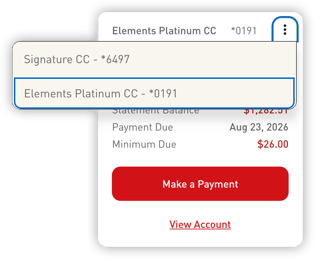 If your business has more than one Elements credit card, tap the icon in the corner of a card tile to switch between them instantly — no need to open a separate account to see a different card's details.
See What You Owe at a Glance
Each card tile shows the Statement Balance, Payment Due date, and Minimum Due right up front, so administrators always know where the business stands without having to dig for a statement.
Pay in a Tap
Make a payment directly from the tile using the Make a Payment button, or select View Account to view the full transaction history and account details.
Everything in One Place: Card Management
Select View Account (or Card Management), and you'll land on a single screen built around the card — the card art, its last payment, and an instant lock/unlock toggle right at the top, so an administrator can freeze a card in one tap the moment something looks off.
Below that, every card tool is laid out in one place — on both desktop online banking and the mobile app:
- Make a Payment — see the next payment amount and due date front and center, with a due-soon reminder when it's coming up
- Advanced Card Controls — manage card settings, including instant lock/unlock
- Advanced Card Alerts — choose how and when administrators are notified about card activity
- Report Card Lost/Stolen — file a report in a couple of taps
- Travel Notices — manage or create new travel notices before an employee travels
- Credit Card Statements — view statements without hunting for a separate portal
- Set PIN — create or modify a card's PIN
- Automatic Payments — set up and manage recurring credit card payments
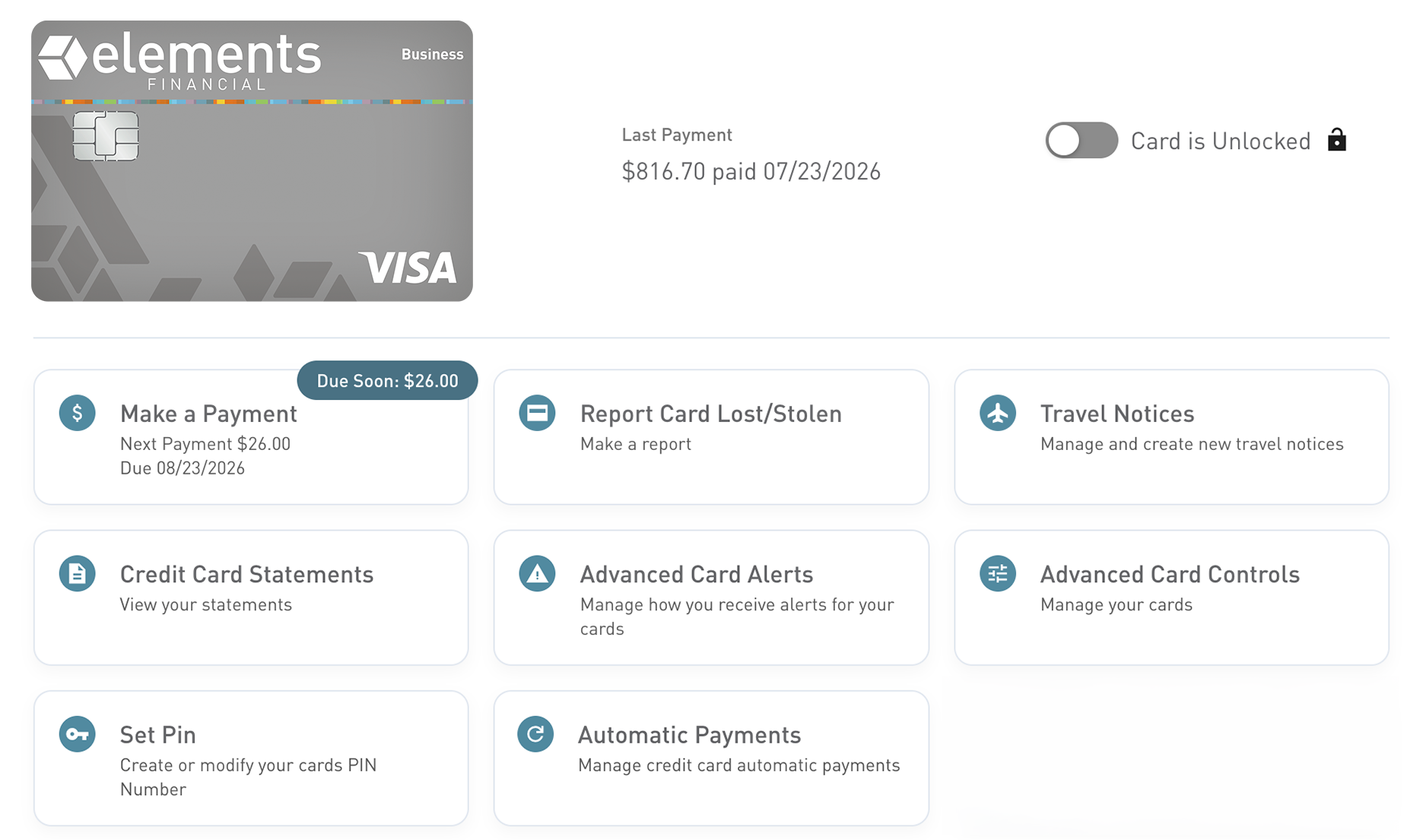
It's everything that used to be spread across separate tools — statements, travel notices, lost-card reporting, alerts, autopay, and sub-user access — now in one convenient spot for Business Card Administrators.
How to Prepare
Before launch, we recommend that business administrators:
- Identify employees who need credit card access
- Document any important account alerts or notification settings you'll want to recreate after the upgrade
- Watch for additional communications regarding the Digital Banking Upgrades as September 9 approaches
Taking these steps now will help make your transition as smooth as possible.
We’re Here to Help
We are committed to delivering a better digital banking experience to you. If you have questions or want a hand getting started, our team is ready to help:
- Contact your Treasury Management Officer directly
- Email: business@elements.org
- Member Services: 800-621-2105
Stay up to date with all the upgrades coming to Business Digital Banking in September.